
Live Video Transmission System: A Practical Guide

You’re walking home with your phone in one hand and your keys in the other. The app on your screen is already sending a live view of your path to a trusted contact, and if something feels off, that person can see what you see, hear what you hear, and know where you are without a flurry of texts. That’s the practical promise of a live video transmission system, not a studio toy, but a chain of tools built to move reality from a camera to another screen fast enough to matter.
Viewers only notice the front end of that chain, the button that says Go Live. The harder work happens underneath, where the phone captures video, compresses it, sends it across changing networks, and keeps the stream usable when the signal dips or the user switches rooms, apps, or even cameras.
Table of Contents
- What a Live Video Transmission System Does
- How Live Video Moves from Camera to Screen
- Encoding, Codecs, and Adaptive Bitrate Explained
- Dual Cameras, Picture-in-Picture, and Multi-Stream Views
- Latency, Bandwidth, and Network Trade-Offs
- Privacy, Consent, and Legal Considerations
- How to Choose the Right Live Video Transmission System
What a Live Video Transmission System Does
A live video transmission system turns a moment in front of a lens into moving images on another person’s screen, usually within seconds. The camera is only the first link. The system also captures sound and video, prepares the data, sends it across a network, and presents it to a viewer.
From one person’s phone to another person’s screen
During a late-night walk, one phone may handle nearly the entire job. It captures the wearer’s face with the front camera, records the path ahead with the rear camera, compresses both views, transmits them, and may save a copy. Software can combine the feeds so a trusted contact sees both the person and the surrounding route.
That arrangement uses the same basic stack found in sports coverage, events, and field reporting. The priorities differ, though. A broadcaster may accept extra setup for polished production. A safety app must favor speed, reliability, consent, and low-friction use when someone is tired, anxious, or moving. A second camera is useful only if the phone can switch or combine views without making the user manage a control panel.
The market scale shows that live streaming has moved beyond a niche feature. One industry report estimates the live streaming market at USD 97.39 billion in 2026, rising to USD 318.56 billion by 2031 at a 26.74% CAGR (Mordor Intelligence live streaming market report). The same report puts video at 91.40% of market share in 2025 and solutions at 77.35%.
Practical rule: for a safety stream, optimize first for the fastest dependable path from camera to trusted eyes. Add visual polish only when it does not slow that path.
That principle explains the value of dual-camera streaming, Picture-in-Picture, and adaptive bitrate. These features connect the system to real conditions: a moving user, a changing mobile signal, and a remote viewer who may need context rather than a perfect production. A demo can look impressive while failing on a weak connection at 11 p.m. Reliability is measured under those conditions.
How Live Video Moves from Camera to Screen
Think of the whole system as a relay race. Each runner hands off the video to the next stage, and if one runner slips, the stream stutters or stops.
Capture is where the story starts
The camera sensor turns light into raw frames. A phone usually captures at 30 or 60 frames per second, which is enough for motion to look natural without forcing the network to carry every detail in its raw form.
Raw video is enormous, so the system can’t send it directly over the public internet. The volume is why consumer live streaming depends on compression and transport protocols rather than just “opening a video call” and hoping for the best.
Encode turns big frames into manageable data
The encoder squeezes those frames using a codec, usually H.264, H.265, or something more efficient but heavier on the device. Without that step, even ordinary video becomes impractical to send.
A useful reference point is uncompressed 1080p60 video, which is roughly 1.5 Gbps, while H.264 is commonly operated around 4 to 8 Mbps for 1080p60. On iPhone-heavy audiences, HEVC can deliver similar quality at about 30 to 40% lower bitrate than H.264, and low-latency live systems often target sub-second transport by keeping WebRTC bitrates near or below roughly 2.5 Mbps and shortening GOP and keyframe intervals (codec and bitrate guidance).
Transport carries the stream over whatever network is available
After encoding, the stream gets wrapped in a delivery protocol such as WebRTC, RTMP, SRT, or LL-HLS, then pushed over Wi-Fi, LTE, 5G, or a fallback connection. Safety apps almost always use push architectures, because the person in motion can’t depend on a remote viewer to pull data from a private phone safely or consistently.
Cloud relays, edge servers, and CDNs shorten the route from source to viewer, but the main benefit is less about elegance and more about reducing the number of places where delay can creep in. A remote monitoring guide such as the remote video monitoring guide is useful background if you want to see how the same pipeline is applied in a security context.
Playback rebuilds the scene
The viewer’s app or browser reassembles the chunks, decodes them, and renders a live picture. If the capture is glitchy, the encode step is too slow, or the network drops, the whole chain feels broken at the viewer side even if only one stage failed.
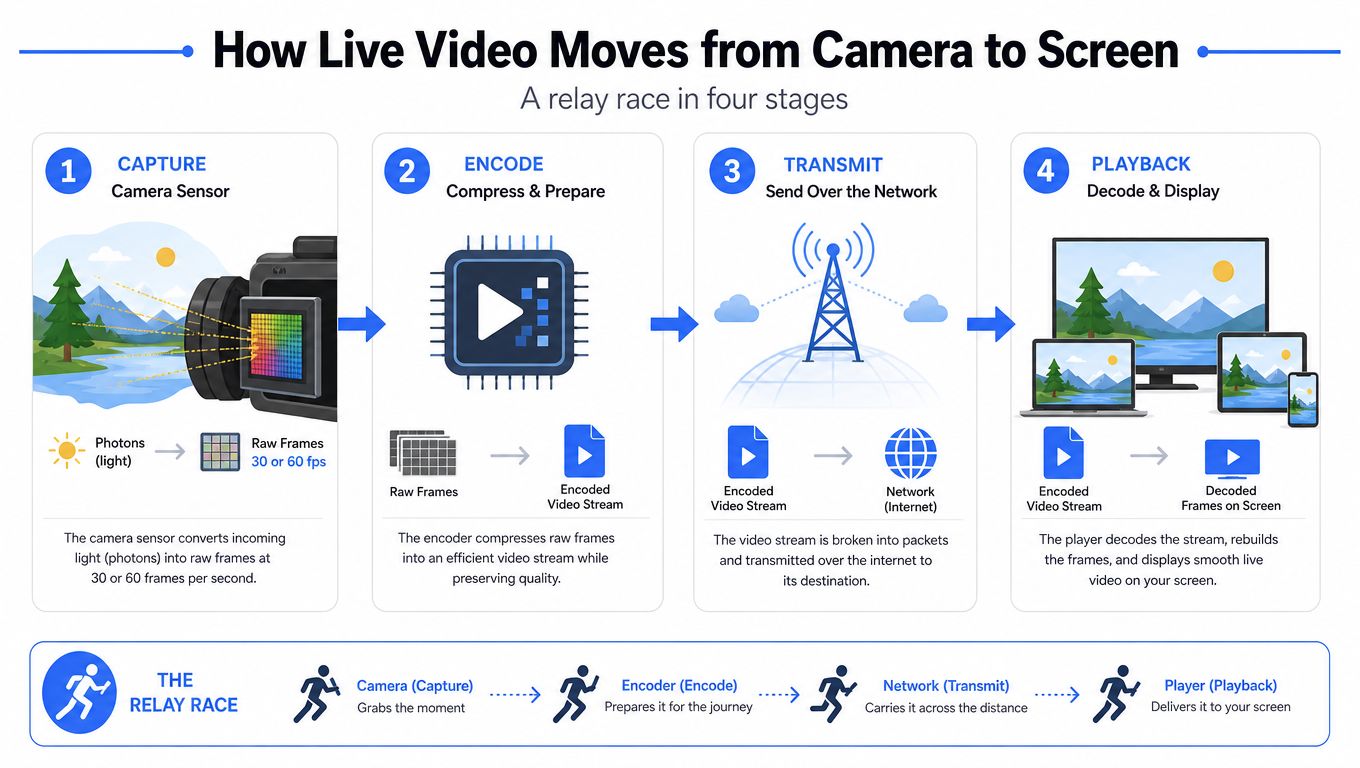
A weakness at any point, a bad camera angle, a slow encoder, or an unstable uplink, can ruin the final experience. That’s why live systems are designed as chains, not features, and why the next decision is usually about the codec and delivery mode rather than the camera app itself.
Encoding, Codecs, and Adaptive Bitrate Explained
Codec choice decides how much quality you can preserve without overwhelming the network or the battery. In mobile safety use, that trade-off matters more than it does in a controlled studio, because the phone is moving, the user may be in low light, and the signal can swing quickly.
Why H.264 still shows up everywhere
H.264 remains the compatibility baseline because it works on a huge range of devices and decoders. It’s the safe default when you don’t know what the viewer is using, which is common in family-sharing and emergency flows.
H.265, also called HEVC, gives you better compression, but support is still patchier on older phones and some older browsers. AV1 is even more efficient, but it takes more work to encode and can be rougher on battery and mid-range hardware, especially when the stream is already juggling dual cameras or background alerts.
| Codec and bitrate comparison | ||||
|---|---|---|---|---|
| Setting | Resolution | Bitrate | Latency | Best for |
| H.264 baseline | 720p30 | about 2.5 Mbps | Lower encode complexity | Compatibility-first mobile viewing |
| H.264 higher quality | 1080p30 | about 4 to 6 Mbps | Moderate | Broad support with sharper image |
| H.265 efficiency | 1080p30 | roughly 40 to 50% lower than H.264 | Moderate, depends on hardware | Better quality at the same data budget |
| AV1 efficiency focus | Varies | More efficient than H.265, device dependent | Higher encode cost | Controlled environments and newer devices |
Practical rule: if a stream must survive weak cellular conditions, choose the codec that keeps the feed alive, not the one that wins a spec sheet.
ABR is the safety valve
Adaptive bitrate streaming lets the player step down to a lower rendition when bandwidth drops, then climb back up when conditions improve. In practice, that means a stream can move from a higher rung to a lower one without freezing the whole feed.
The key trade-off is latency versus resilience. ABR needs time to measure throughput and switch rungs, which is why it’s so useful on flaky mobile networks and less attractive if you’re chasing the absolute smallest delay. The shorter segment window for live use, around 2 to 4 seconds, helps the stream adapt more quickly to changing network quality (adaptive bitrate streaming guide).
The most practical choice is usually the boring one. A safety app on a budget Android phone in a weak-signal area will usually do better with H.264 at 720p and aggressive ABR than with a fancier codec that looks better on paper but falls apart when the user walks past a dead spot.
Dual Cameras, Picture-in-Picture, and Multi-Stream Views
A person streaming for safety may need to show their face, surroundings, or both at once. Switching between views during a stressful moment can hide useful context, so the camera layout becomes part of the safety design.
Why dual capture matters more in safety apps
Modern phones can run a wide front lens and a rear lens in parallel, then merge both feeds in software. A watcher can see the person’s expression, the route ahead, and signs that the situation is calm, confused, or escalating.
That wider view uses more bandwidth and battery. Dual capture often needs roughly 60 to 80% higher bitrate than a single feed at the same quality, which is why many safety apps cap each layer at 720p instead of sending both cameras at full resolution.
The three layouts people use in practice
There are three common setups:
- Front only: useful when the watcher needs to see the person’s face and hear their tone during a check-in.
- Rear only: useful for walking routes, rideshares, or incidents where the environment is the main concern.
- Picture-in-Picture: the wearer’s face appears in a smaller overlay while the wider rear view remains visible. The remote viewer gets both physical context and emotional cues.
Thermal throttling can limit the design. As the phone heats up, performance drops, the battery drains faster, and stream quality may degrade at the wrong moment.
The right dual-camera layout is one the user can leave running without thinking about it. If changing views during an incident feels fiddly, the app has already failed.
Cloud-side multi-stream supports groups and dispatchers. Several phones can send different angles into one shared room, helping one person move while another follows remotely. The multiple camera streaming setup guide covers implementation details for this arrangement.
In a personal-safety context, dual and multi-stream features make the feed useful when the user cannot stop and narrate every detail. The system should preserve the view that matters most, even when bandwidth, battery, or attention is limited.
Latency, Bandwidth, and Network Trade-Offs
People love to ask for the lowest possible latency. In mobile safety, that’s the wrong question. The better question is how much delay the use case can tolerate before the stream becomes less useful than it is fragile.
Low delay sounds great until the connection moves
A live feed has several places where delay can accumulate, capture buffering, encode time, transport, and segment alignment. Shorter transport chains help, but chasing the smallest possible delay can remove the very buffers that keep the stream from breaking when the phone turns a corner or drops from strong Wi-Fi to shaky cellular.
Bandwidth needs climb quickly with quality. A moving phone can see throughput change a lot within the same block, which is why a stream that looks stable at home can wobble badly outdoors. A 720p30 feed around 1.5 Mbps is much easier to keep alive than a 1080p60 stream that asks for 4 to 6 Mbps and expects the network to stay polite.
Protocol choice changes the feel
WebRTC usually wins when the priority is fast interaction and sub-second delivery, because it runs over UDP and reacts quickly. HTTP-based delivery like CMAF or HLS tends to be more forgiving under variable conditions, but it usually adds more delay.
FEC and ARQ handle packet loss differently. FEC tries to prevent visible gaps by sending redundancy up front, while ARQ asks for lost data again, which can help quality but also add delay if the link is already unstable. Jitter buffers sit in the middle and smooth over timing problems, but larger buffers can make the stream feel slower.
| Latency vs. Stability Trade-Offs by Protocol | |||
|---|---|---|---|
| Protocol | Typical Latency | Stability on Variable Networks | Best Fit |
| WebRTC | Lowest | Good, but sensitive to poor links | Live safety, conversational monitoring |
| SRT | Low to moderate | Strong for lossy networks | Contribution and remote ingest |
| LL-HLS / CMAF | Higher than WebRTC | Very stable | Broad device compatibility and scalable playback |
A live remote video monitoring guide can help when you’re comparing this to security-style monitoring, where stability may matter more than the last few hundred milliseconds. The rule of thumb is plain enough, choose the lowest latency your use case truly needs, not the lowest latency the protocol promises on a slide.
Privacy, Consent, and Legal Considerations
The most overlooked part of live video is not bandwidth, it’s permission. Once a stream can capture faces, voices, license plates, and location trails, the technical design has to match the legal and social reality of recording people in motion.
Consent should be visible, not buried
Different jurisdictions treat recording differently. Two-party consent rules apply in states like California, Illinois, and Florida, while one-party-consent jurisdictions allow recording when one participant agrees. That difference matters even before the stream leaves the phone.
In personal-safety apps, the safer pattern is usually the same. Use an activation chime, a visible on-screen indicator, and an explicit opt-in flow when adding a trusted viewer so the user understands who can see the feed and when it is active. For public capture, apps often blur bystanders server-side to reduce exposure when the lens sweeps across people who never agreed to be on camera.
Retention and location can trigger extra care
If the feed records faces or license plates in public, GDPR Article 9 can become relevant because the stream may carry sensitive personal data depending on how it’s processed and stored. That’s one reason many systems keep retention tight and limit access to people who need to review the incident.
A common operational pattern is to keep recordings for a limited period, often 30 days in personal-safety workflows, unless a law-enforcement request pauses deletion. Cross-border use also matters, because a stream started in New York and viewed in London can still run into UK ICO expectations even if the recorder is in the U.S.
Design for the strictest likely regime, not the friendliest one. The user won’t care which jurisdiction you forgot when the complaint lands.
The practical effect is simple. Consent flows, retention rules, and viewer access controls are not legal garnish, they’re part of the product’s safety story, and they need to be designed alongside the stream itself.
How to Choose the Right Live Video Transmission System
A phone is moving between a crowded street, a weak cellular zone, and a home Wi-Fi network. The right system keeps the safety feed usable through those changes, while showing the user when recording is active and who can view it. Start with the use case, because it determines which compromises are acceptable. Personal safety prioritizes mobile reliability, visible consent, and simple controls. Field reporting and event streaming may accept more setup when production control matters more.
A quick filter that avoids bad purchases
Score each candidate from 1 to 5 against these criteria, then weight the results according to the job:
- Capture flexibility. Can it handle a single camera, dual cameras, front and rear switching, and Picture-in-Picture without making the user wrestle with the app?
- Network behavior. Does it remain usable as a phone moves between cellular and Wi-Fi, or does a brief signal dip stop the stream?
- Consent and recording controls. Can the user see when recording is active, identify viewers, and control how long video remains stored?
- Platform independence. Does it work across browsers, phones, and operating systems, or does it require one closed platform?
- Total cost of ownership. Include mobile data, cloud storage, moderation, and support time, not only the purchase price.
| Live Video Transmission System Selection Criteria | |||
|---|---|---|---|
| Criterion | Personal Safety | Field Reporting | Event Streaming |
| Capture flexibility | High priority | Medium priority | Medium priority |
| Network behavior | Highest priority | High priority | Medium priority |
| Consent and recording controls | Highest priority | Medium priority | Medium priority |
| Platform independence | High priority | High priority | High priority |
| Total cost of ownership | High priority | High priority | High priority |
A vendor demonstration is only a starting point. Test the system on real phones, in real locations, for at least 48 hours. That trial can reveal problems a specification sheet misses, such as heat-related battery drain, awkward hand changes, or unstable coverage outside a train station.
One option is 3rd-i, which streams video, audio, and location to selected contacts and trained Safety Agents, with emergency escalation through RapidSOS. Its dual-camera streaming, Picture-in-Picture, and monitoring features make it a useful benchmark for comparing a personal-safety workflow with a general live streaming stack.
For a fuller product view, start with the 3rd-i live video streaming app. Then test the system against your coverage zones, consent requirements, and battery limits before committing.
If you are building a safety-first streaming workflow, talk to the team at 3rd-i for organizations. Test the pipeline with your real phones, routes, and contacts, and examine how it handles the conditions your users will face.