
App to Call 911: How Escalation Really Works
An app to call 911 doesn’t replace dialing 911. It adds a monitored second path: from a locked phone, a live SOS can start in as few as 2 taps and carry your location, audio and video toward dispatch through a trained Safety Agent.
That distinction matters more than it sounds, because the system many people picture as permanent and uniform is neither. The National 911 Program records that the first 911 call was placed on February 16, 1968, from Haleyville, Alabama, and answered by U.S. Representative Tom Bevill at a nearby police station. The same history notes that 911 wasn’t officially established as the nation’s emergency calling number until the Public Safety Act of 1999.
Three decades passed between a ceremonial first call and a national standard. Emergency access has always grown in patches, and apps inherit those patches. So the useful question isn’t which app opens a dialer fastest. It’s which one turns a confusing, moving moment into a verified package that a dispatch center can act on, especially when the person in trouble can’t speak or the person watching is in another city.
Table of Contents
- What an App to Call 911 Can and Cannot Do
- Why One Map Pin Is Not Enough
- How a Safety App Escalates to 911
- What Information Reaches Emergency Dispatch
- Late Walks Rideshares and a Friend in Another City
- Where an App Still Cannot Reach 911
- Set Up Help Before the Next Late Trip
What an App to Call 911 Can and Cannot Do
An app to call 911 is not a replacement for the phone dialer. It’s a second path that can send location, audio, video and a short human summary toward the public-safety answering point that serves the person in trouble, reflecting how people call for help now.
The scale explains why that second path gets built at all. The Smithsonian’s National Museum of American History reports that an estimated 240 million 911 calls are made each year in the United States, and that more than 80% now originate from wireless devices. That caller is often walking, riding in a car, somewhere deep inside a large campus, or unable to describe which door they’re standing beside. The original 911 architecture was built around fixed phone lines and didn’t automatically supply exact caller location, which is why regulators and carriers developed Enhanced 911 to pass along a callback number and, where technically available, location data.
Five ways an app or phone can reach emergency help:
| Path | Who answers first | What arrives | Best when | Main limit |
|---|---|---|---|---|
| Direct 911 voice call | PSAP telecommunicator | Voice, callback number, carrier location when available | Immediate danger and you can speak | You must describe the scene and the exact entrance |
| Text-to-911 | Local center only if it accepts SMS | Text and limited location | You can’t speak and that center supports text | Not universal, and SMS location routing isn’t guaranteed |
| Phone Emergency SOS | Carrier 911 path from the handset | Emergency voice call plus handset data such as Medical ID where supported | Locked phone and no safety app | Little or no live video for dispatch |
| Monitored safety app | Trained Safety Agent, then 911 via RapidSOS | Live location, audio, video and agent context | You want someone watching before you can’t talk | Not a substitute for dialing 911; US coverage limits apply |
| Friend calling from another city | Often the friend’s local center first | Only what the friend can describe | You can see the danger and they can’t call | Transfers often add 5 to 10 minutes or more |
Match the row to the moment
A late walk home from a train station fits the monitored row, because the risk builds over twenty minutes and a watcher can see the route thin out. A rideshare fits the same row for a different reason: the passenger is moving, so a static description of “I’m in a silver sedan” is worth far less than a stream that shows the car, the driver and the corner it just passed. Someone who’s hiding in a closet and can’t risk being overheard needs text-to-911 if the local center accepts it, plus a monitored stream running without sound.
What none of these rows does is handle the hour after an incident. If a collision happens on the way home, The Law Office of Bryan Fagan’s guide walks through the scene steps that decide how a claim goes later, from moving out of traffic to exchanging details and documenting the damage. A recorded stream and route history feed the same record, which is why the documentation layer belongs in the same conversation as the emergency layer.
Keep ordinary 911 one tap away no matter what else you install. The app is the second call, not the only one.
Why One Map Pin Is Not Enough
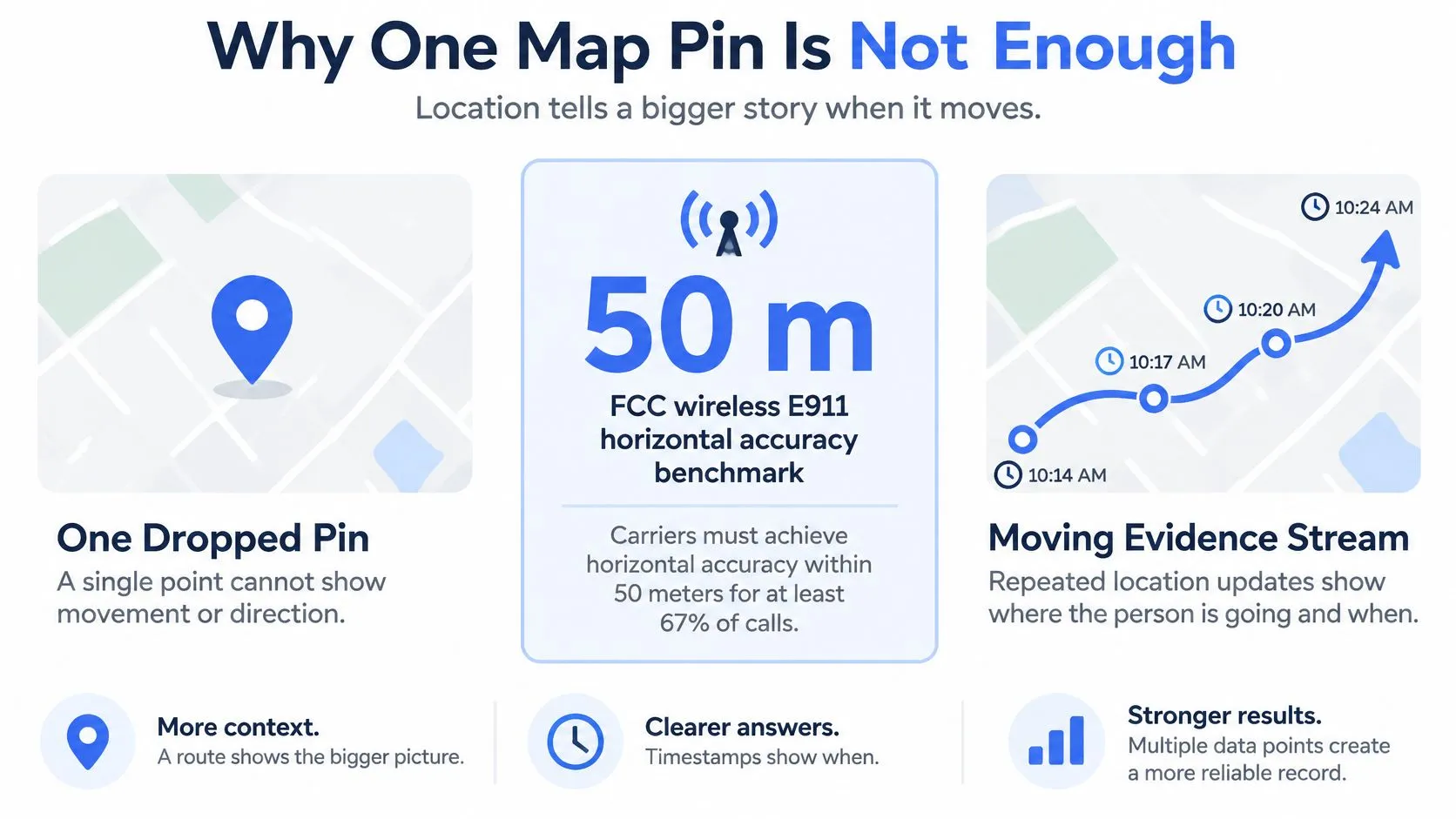
Location is the part of an emergency payload people trust most and understand least. The current FCC indoor location accuracy benchmarks set a practical standard for carriers: horizontal accuracy within 50 meters for at least 80% of wireless 911 calls, or a dispatchable location instead, and for compatible indoor calls a vertical target of plus or minus 3 meters for 80% of calls.
Read those numbers as a floor for the whole industry, not a badge any single app earns. Fifty meters is roughly half a city block. In a dense downtown that can put the dot on the correct building and the wrong side of it.
Where a single coordinate misleads
- Parking structures. A fix taken inside a garage often resolves to the roof or the street outside, so responders search the wrong level while the caller is two floors down.
- Campus towers. A coordinate can name the building correctly and still miss the floor, which matters when a stairwell and a lecture hall share a footprint.
- Rideshares. A static pin freezes the moment it’s captured while the car keeps moving, so the drop-off point and the current position drift apart.
- Dense blocks. A coordinate identifies a property, not the loading dock, side gate or rear entrance a responder should approach.
A live route fixes several of these at once, because direction and divergence carry meaning a point can’t. If the planned path was a straight walk and the trail hooks into an alley and stops, that’s information. An entry pin handles the rest by naming the door, which latitude and longitude rarely do. For a plain-language walkthrough of how the location handoff works from the center’s side, this explanation of how 911 finds your location is worth ten minutes.
What a location update should carry
One coordinate is a snapshot. A stream of them, each labeled, is evidence. A serious update carries a timestamp, an uncertainty radius, altitude or floor when the device can produce it, motion state so a watcher knows whether the person is walking or in a vehicle, and a freshness flag so nobody mistakes old data for new. When the connection drops, the system should hold the last validated point, label it as stale, and say how old it is.
These benchmarks describe carrier-to-center performance, so treat them as the standard an app is trying to meet rather than a promise that any single pin is accurate indoors or in a moving car. Monitoring and escalation add context on top of a direct 911 call. They don’t stand in for it.
How a Safety App Escalates to 911
Escalation is a checked handoff of context, not a hidden phone call placed on your behalf. The FCC’s guide to wireless 911 service draws the line clearly: basic wireless 911 routes the call to a Public Safety Answering Point, while enhanced service also supplies caller identity and location within defined accuracy parameters. A monitoring layer adds value in the gap between those two, by gathering and confirming details before anyone dials.
Here’s the sequence in the order it runs.
- Someone starts the SOS. The user presses SOS, or an Emergency Contact triggers it on the user’s behalf.
- The stream opens to a person. Livestream, audio and location go to a trained Safety Agent, and text communication starts so the user can type instead of speak.
- The agent verifies. Is the stream still live? Where was the last confirmed position? What is happening, and is anyone else nearby?
- The agent escalates. If emergency help is needed, the agent sends the stream, location and critical details to 911 through RapidSOS, the emergency response data platform public safety agencies use.
- Selected contacts are alerted. The people the user chose get the location and the status, without needing to ask.
- The path degrades on purpose. If video fails, audio and location remain. If location is old, its age is stated. If the monitoring layer can’t be reached, direct emergency calling has to be the most obvious thing on the screen.
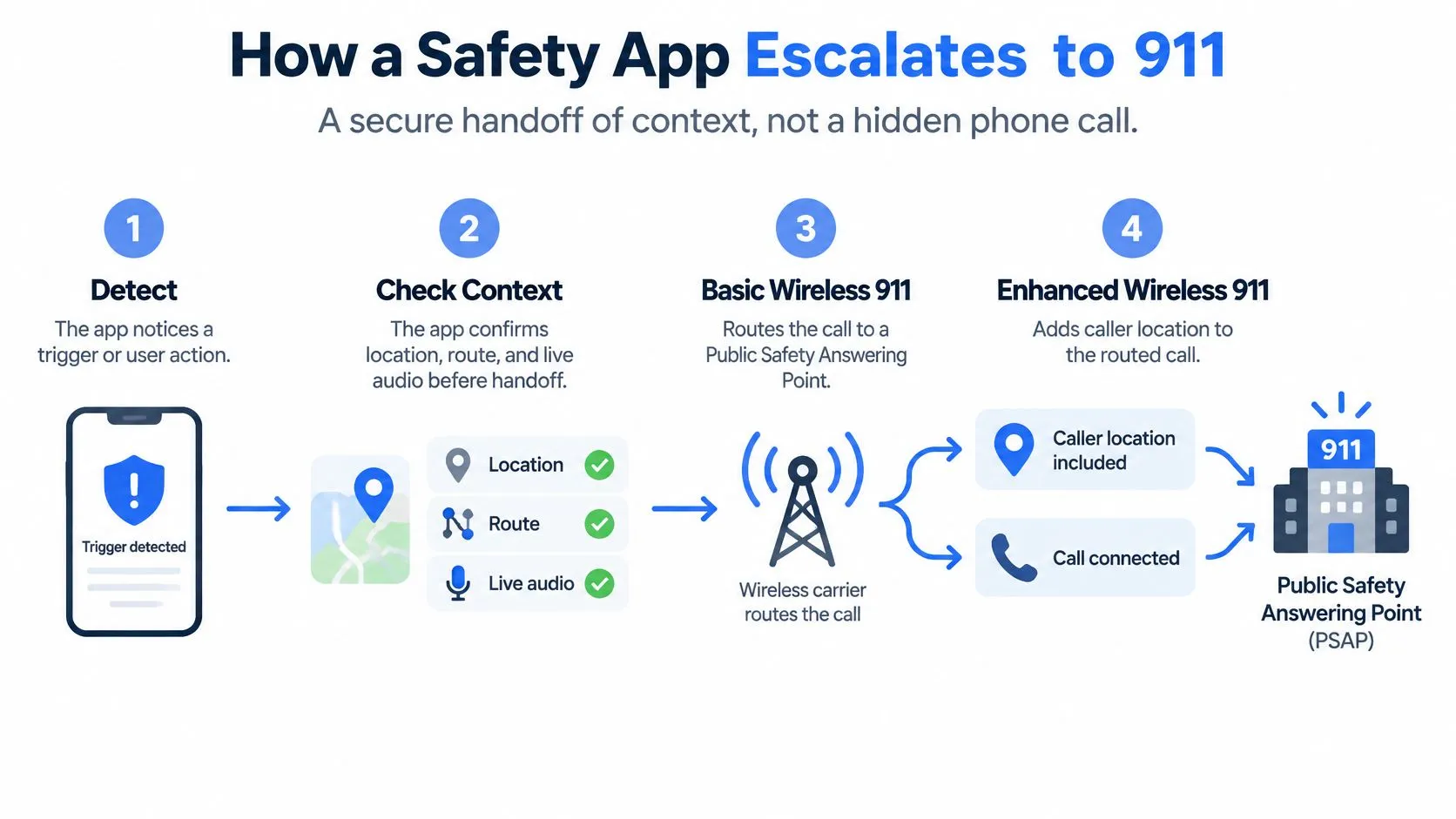
Pressing SOS, or having an Emergency Contact press it for you, sends the stream and location straight to 911 through a 3rd-i Safety Agent. An SOS to that agent connects you to a real person, with 911 behind them. That’s the difference between an app and a dial button: someone is checking whether the situation is still live before and while dispatch is engaged.
Why the agent checks before dialing
A person who is being followed doesn’t always need a patrol car. Sometimes they need someone watching the next four minutes, ready to escalate the moment the situation turns. An agent who can see both cameras and read the route makes that call with more information than a caller can speak aloud.
The handoff rule: every field in an incident record should answer one of two questions. Where is this person now, and what did we verify? Anything that answers neither is clutter on a dispatcher’s screen.
The engineering underneath is unglamorous: immutable timestamps, synchronized clocks, explicit consent states, retry queues, and an audit trail showing what was transmitted and when. That audit trail is also what makes 24/7 security monitoring meaningful rather than theatrical, because coverage you can’t reconstruct afterward is coverage you can’t trust.
Test the hard conditions separately instead of assuming a working connection means a usable location. Indoor, low-signal, backgrounded, battery-constrained and moving-vehicle situations each break differently.
What Information Reaches Emergency Dispatch
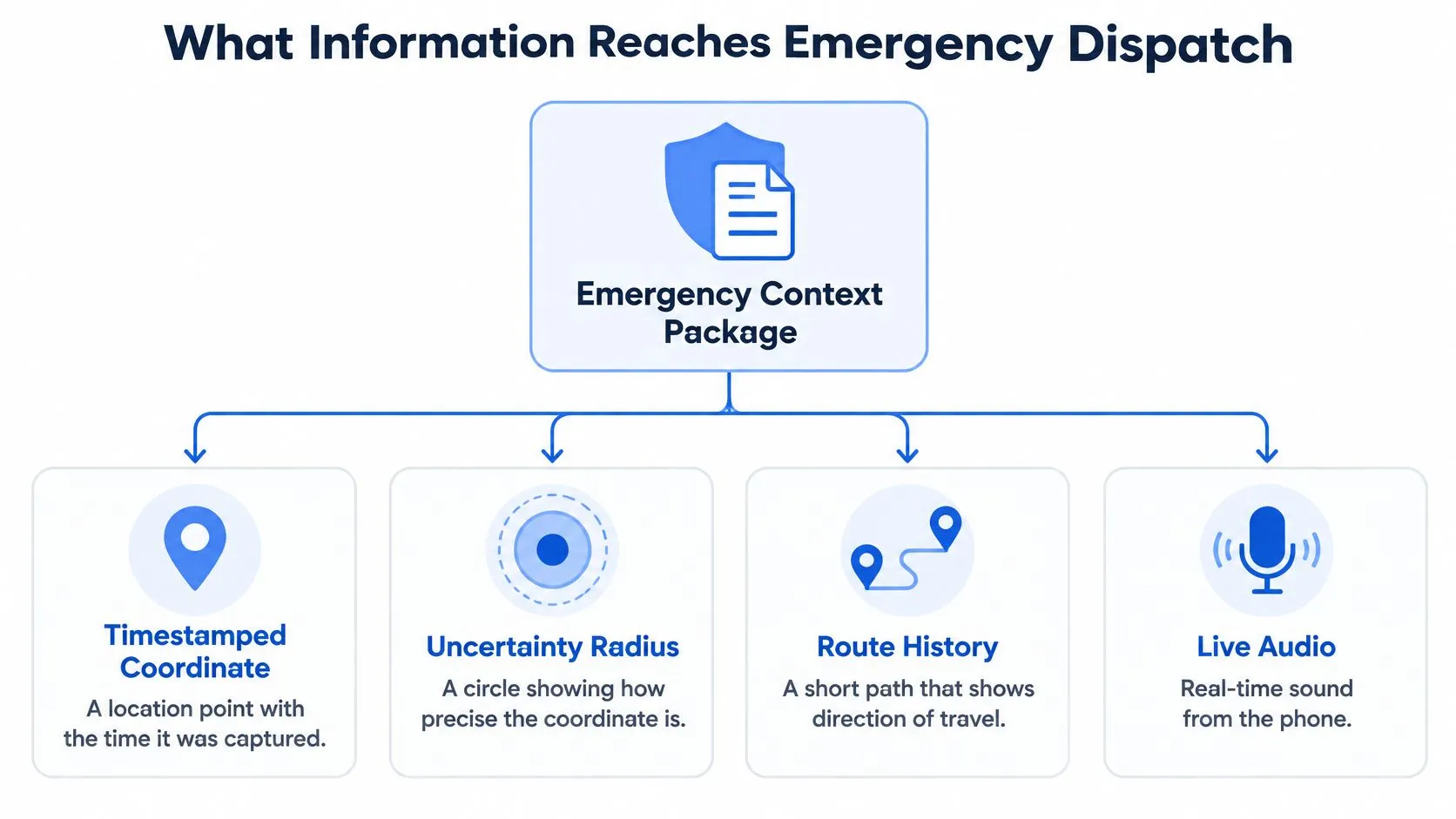
The payload is the point. A telecommunicator who receives a timestamped coordinate with an uncertainty radius, a short route history, live audio, video from both cameras, a callback identity, the incident category and an entry pin can dispatch with far less guesswork than one working from a shouted description.
| Channel | What dispatch learns | How it fails | What can remain |
|---|---|---|---|
| Live location | Position plus how fresh it is | Indoor error or a stale fix | Last validated point labeled with its age |
| Route history | Direction and whether the path changed | GPS gaps along the trip | The last segment before the gap |
| Audio | Speech and background sound | Microphone blocked or muted | Location and the agent’s notes |
| Front and rear video | The scene and who is present | Camera, permission or bandwidth failure | Audio and location |
| Callback identity | How to reach the user | Wrong number or a dead phone | The stream until it ends |
| Emergency entry pin | Which door or entrance to use | The user never set it | A building-level coordinate only |
| Agent notes | Category, hazards and what was verified | The agent can’t reach the user | The automated location payload |
What each channel changes for the person answering
Video removes the worst kind of uncertainty, which is not knowing what responders are walking into. A ten-second look at a room tells a telecommunicator more about hazards, injuries and the number of people present than a paragraph of description. The entry pin solves a smaller but stubborn problem, separating the correct entrance from the middle of a building, which is where a dropped pin lands when a property spans half a block.
Callback identity is the quiet workhorse. If the stream dies, dispatch can still reach the person directly, and a ringing phone is sometimes the fastest way to confirm someone is conscious.
Users can tap a button to stream live video, audio and GPS location directly to emergency dispatchers and to chosen family or friends at the same time. Starting or using SOS or dispatch authorizes 3rd-i to share information, which may include location, with RapidSOS and public safety responders to facilitate emergency assistance. That consent line matters, because the alternative is a system that either shares too little to help or more than the person expected.
What survives a partial failure
Design for the half-broken case, because that’s the normal case. Location can arrive without video, audio can arrive without a face, and a last confirmed point should carry its age rather than pretending to be current.
Messaging, location sharing, AI audio transcription and an AI summary belong to the record built after the incident, not to a feed a dispatcher is required to watch live. They exist so that a confusing night can be reconstructed later, calmly, with timestamps.
Late Walks Rideshares and a Friend in Another City
These three situations map to two kinds of help: a monitored safety app for a late walk or rideshare, and a friend’s emergency when the helper is in another city.
A student leaves the library at 11:40 p.m. and walks fourteen minutes to her apartment. She goes live so two friends can follow the route and watch the stream. If something feels wrong, a squad member can send a one-tap check-in, and she can answer with one tap. She can also text a Safety Agent during the trip, with SOS available if she needs emergency assistance.
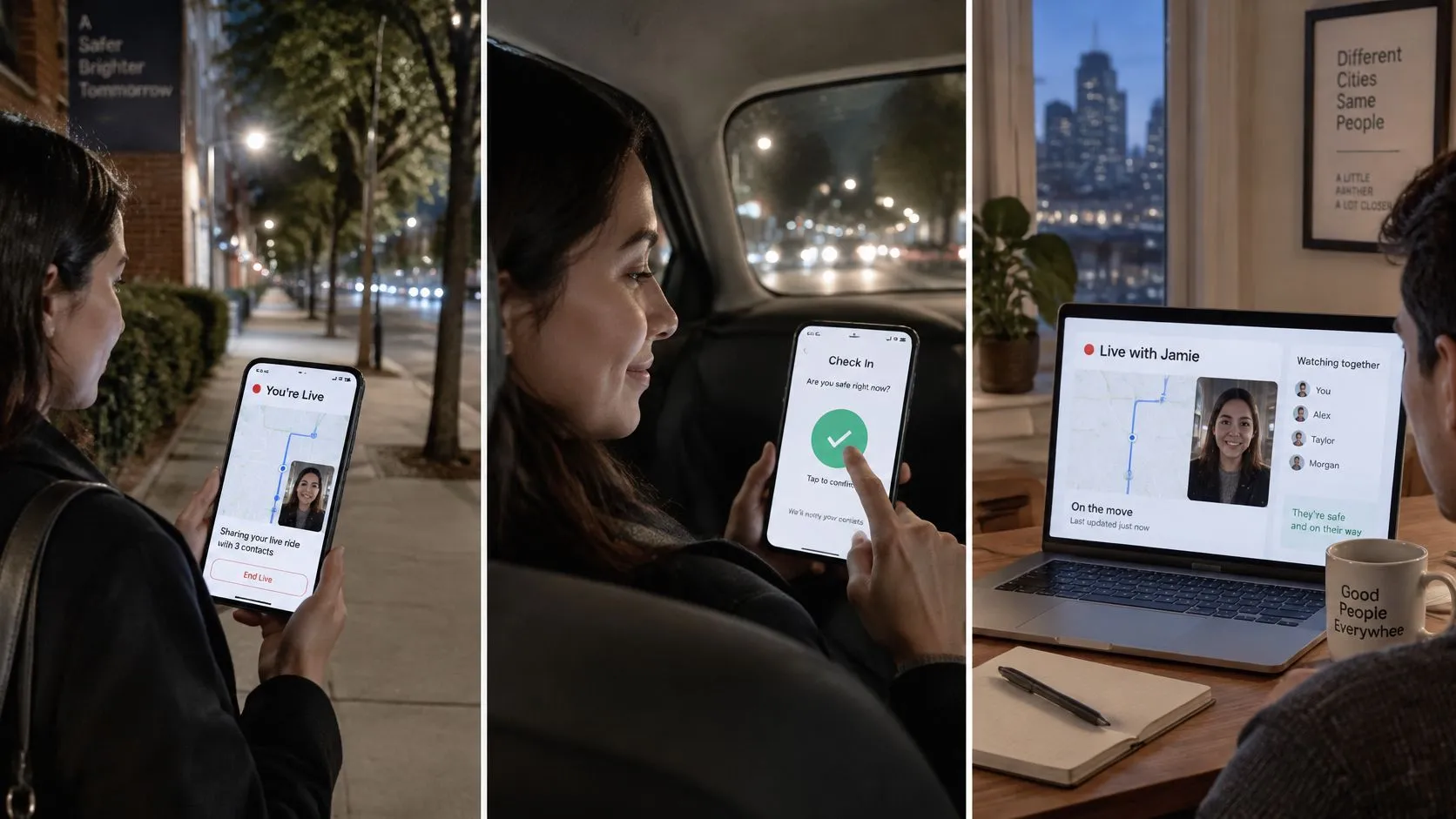
A rideshare uses the same monitored-app approach for a different reason: the passenger is moving in a vehicle. Trusted people can follow a shared live trip, while the rider can stream the ride and keep a Safety Agent and emergency dispatch one tap away. The stream gives watchers a view of what is happening as the trip unfolds. These rideshare safety tips cover practical ways to prepare before getting in.
The case a normal phone call handles badly
Now consider a parent in one state receiving a frightened call from a daughter in another city. The daughter cannot say exactly where she is. Calling 911 for someone in another city routinely costs 5 to 10 minutes or more because the call may reach the wrong dispatch center, require a transfer, and leave the caller describing a location they cannot see.
With 3rd-i, an emergency alarm for a friend is routed to the 911 center covering the friend’s location, with that location already passed on. The key difference is the handoff: the helper does not have to identify the correct dispatch center and explain an unfamiliar place before help can be routed.
Emergency contacts connected to an SOS receive a Critical Alert that can sound through silent mode and Do Not Disturb and show the user’s location. That is different from relying on a group chat, where an alert may be missed if a phone is muted.
Use the friend path when someone else needs help and cannot make the call. Use your own SOS when you are the person in danger. SOS features supplement, rather than replace, calling 911 or the local emergency number.
If a late walk ends in a collision, a live record may help clarify what happened. Evidence of where a pedestrian was and when can matter when filing a pedestrian accident claim, though a stream cannot establish every detail of an incident.
Where an App Still Cannot Reach 911
No safety app dials 911 everywhere, the same way, for every person. SOS and dispatch features are not a substitute for dialing 911 or the local emergency number, and the RapidSOS-powered path is currently available only in the United States, with possible gaps by area and by time.
Capability depends on the local center, and centers differ. A 2025 FCC notice published in the Federal Register said the agency was considering improvements to wireless 911 location and text-to-911 capabilities while explicitly stating it was not proposing location-based routing requirements for SMS-to-911. In plain terms, a text message isn’t guaranteed to find its way to the right center the way a voice call is.
The gaps most app roundups skip
Accessibility is where marketing language and lived experience separate. Blind users run into unlabeled controls and low-contrast screens at exactly the moment they can’t afford to explore an interface. Deaf users need real-time text, captions, usable video or sign-language support, and many emergency flows provide none of the four. Language is a third gap with real operational cost, since language discordance can lengthen a 911 call and delay both the interpreter connection and the dispatch decision.
Ask before you trust it: can I still place an ordinary voice call from this screen, and does this specific center accept text?
Four checks settle most of the doubt:
- Voice fallback. Can you place a normal call without opening the app or fighting a menu?
- Text support. Does the center covering your usual locations accept text-to-911 today?
- Disclosure. Which languages and assistive tools does the app list, not imply?
- Destination. Are you reaching friends, a monitoring service, or the answering point itself? Those are three different things.
Emergency numbers also change at the border. A product should never imply that app escalation guarantees 911 or 112 access, or an equivalent response, in every country.
Set Up Help Before the Next Late Trip
The setup that matters takes one evening, and it’s mostly writing things down and checking that the boring parts work.
Start with the people. Write out who should be called, in what order, and keep the list current as roommates move and phone numbers change. A contact list built two years ago is a list of strangers.
Locked-phone access comes next. A live SOS that can start in as few as 2 taps from a locked phone is worth more than any feature buried three screens deep. Put the Go Live and SOS controls where a shaking hand finds them without looking.
Then match the tool to the risk. A monitored stream fits an unobserved walk, a rideshare, campus travel or lone work. A plain 911 call is the move the moment there’s an immediate threat and the phone can dial.
On every individual plan, 3rd-i includes Safety Agent monitoring and 911 escalation, and a user can go live so a squad watches the whole trip with a Safety Agent and real emergency dispatch one tap away. All of it supplements a direct 911 call rather than replacing one.
Tonight’s check is three questions. Who can see a non-emergency live view? Is the emergency contact list accurate? And is the direct 911 control still obvious on the lock screen? Fix whichever answer is no.
You don’t have to be the person who can talk in order to get help moving. 3rd-i streams live video, audio and location to the people you choose and to a trained Safety Agent, then escalates to 911 through RapidSOS when the situation calls for it, so a late walk or a rideshare isn’t watched by nobody. Visit 3rd-i to set up your squad, your emergency contacts and a live SOS you can start from a locked phone before the next trip.